Built in mChatAI #2: How "a real chess engine, not random moves" became Speed Chess
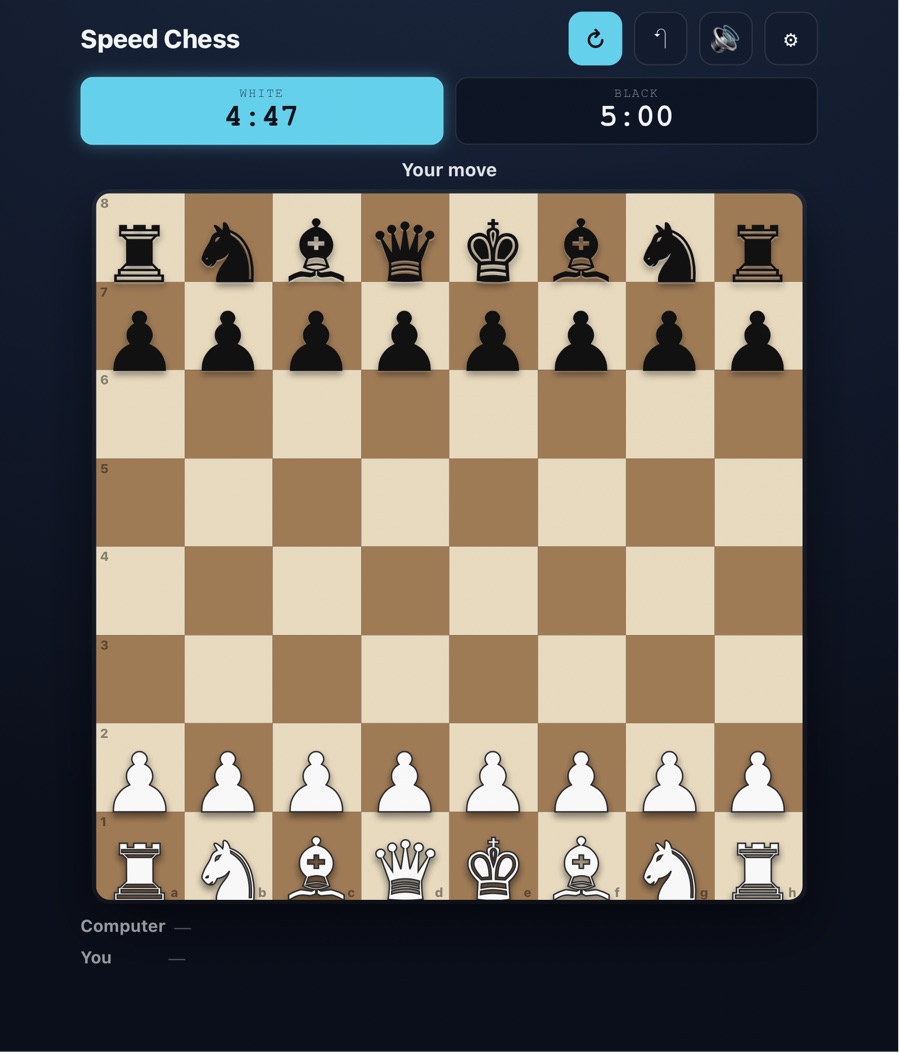
This is the second entry in Built in mChatAI, the series where I walk through something I built with the app and show my work. The first post was Sunset Glider — a hand-rolled canvas game with no framework underneath it. This one is the opposite pole. Speed Chess leans hard on reusable game-engine parts from an open registry, and a cheap model did the assembling.
It started with a demanding one-liner: I didn't want a toy that shuffled pieces around. I wanted a real opponent. Here's the origin ask, word for word:
Chess versus the computer with an Easy / Medium / Hard difficulty selector. The computer opponent MUST use a real chess engine (minimax with piece-square evaluation) that defends its pieces and does not give away material — not random moves. Easy = shallow search, Hard = deeper search.
That build installed cleanly. Out of it came a working chess-vs-computer with three difficulty levels — an opponent that actually searches for moves and doesn't hang its queen. That build became the base every later version iterated on.
Where the engine actually came from
Here's the part I want to be honest about, because it's the interesting part.
The model did not write a minimax chess engine from scratch. The chess rules and the search AI come from reusable components — we call them "Lego" — that live in the open mchatai-source registry, which is public on GitHub. What the model did was assemble and wire together the right registry parts into a working game, and then iterate on it one focused edit at a time.
The pieces it pulled in and inlined:
entities/Board8x8.js— the board modelentities/ChessRules.js— legal move generation and rulesentities/MinimaxAI.jsandentities/ChessAI.js— the search opponentcore/TurnBasedManager.js— turn handlingresources/AudioManager.js— procedural sound
That's the real story of Speed Chess: the platform supplies a correct chess engine as Lego, and a small model composes it into a playable game and customizes it. Contrast that with Sunset Glider, which was written by hand against a bare canvas with no framework at all. Same app, two completely different build styles — and both are legitimate. Sometimes you want the model to write everything; sometimes you want it to stand on parts that are already correct.
For the record, this is a real chess implementation, not a facade. Reading the final file: per-piece pseudo-legal move generation, then filtered so you can't make a move that leaves your own king in check (_wouldLeaveKingInCheck, isKingInCheck), plus checkmate and stalemate detection and castling. The AI is genuine negamax with alpha-beta pruning (if (alpha >= beta) break) over a material + piece-square evaluation, with search depth scaling by difficulty: 2 plies on Easy, 3 on Medium, 4 on Hard.
The three change-requests
After the base build, the game grew through three focused change-requests. Each one is a recorded ask — the harness wraps every request with a short "write-first, preserve what works, stay offline" preamble, but the substance is below, verbatim.
v2 — castling notation:
Castling now works in the chess engine. Make ONE improvement: in the move-history list, show a castling move as "O-O" for kingside or "O-O-O" for queenside, instead of a plain king move.
Small, but it's the kind of correctness detail that makes a chess move list feel right. Kingside castling now reads O-O, queenside reads O-O-O.
v3 — the speed clock (this is the one that made it "Speed Chess"):
add a SPEED-CHESS clock. (1) Two countdown clocks, White and Black, shown near the board in mm:ss. (2) The side-to-move clock ticks down 1s/second; on each move, stop your clock and start the opponent's. (3) At 0:00 that side LOSES ON TIME — end the game, show "White wins on time" / "Black wins on time". (4) A time picker with 1 / 3 / 5 / 10 minute buttons (default 5).
This is the turning point. Two whiteTime/blackTime countdowns, shown mm:ss, ticking via setInterval, that flag the game at zero. A blitz clock turned a chess app into a speed chess app.
v4 — mobile-first, board-as-hero (the ask had four numbered items; I've quoted items 1, 2, and 4 as recorded — item 3 in the original list isn't reproduced here):
make this look great on a phone by making the chess board the hero and shrinking the surrounding chrome... 1. Compact the clocks into a single slim row of two small clocks. 2. Fold Difficulty, Play-as, and the Time control into a compact collapsible "Settings" panel that is CLOSED by default. 4. Make the board the hero: maximize board size to fill the width on mobile, keep squares and pieces large and easily tappable (~44px+ touch targets).
This is the version you'd recognize as the published one: a slim two-clock row, a collapsed Settings panel, and a big tappable board that fills the screen.
An honest note on v5
The published build is internally "v5," and I don't want to oversell it. v5 added no new player-facing feature. A code diff shows it was an engine-hardening / robustness pass — it added fallback evaluation and move-generation helpers — and then it got published as "Speed Chess."
So the real feature arc is: engine origin → castling notation → speed clock → mobile-first, shipped as v5. There's no secret v5 feature. It was a stabilize-and-ship step.
Run facts
For the people who like the receipts:
- CLI: every iteration ran through Claude Code, the command-line agent.
- Model: the verified iterations (v2, v3, v4) ran on Claude Haiku 4.5 (
claude-haiku-4-5) — a small, cheap model. That's the point: assembling registry Lego into a correct game and iterating feature-by-feature doesn't need a frontier model. (I won't attribute a specific model to the origin build — I couldn't separately confirm it.) - Lego used:
Board8x8.js,ChessRules.js,MinimaxAI.js,ChessAI.js,TurnBasedManager.js,AudioManager.js— all from the openmchatai-sourceregistry. - The artifact: a single, self-contained HTML file, about 52 KB (~1,457 lines). No
chess.js, no external library, no CDN. Fully offline. The board renders with Unicode chess glyphs on a CSS-grid board, and sound is procedural Web Audio — short synthesized tones, no audio files.
What the platform did around all this
mChatAI+ is a native macOS app, and its builder — AIWizard — turns a plain-English goal into a playable mini-app and then iterates on it the same way. A few things happened quietly in the background of this series:
- Verified before install. Each build gets loaded and render-checked before it lands, and the platform auto-iterates on failures.
- Made offline-safe. No live dependency snuck in; the final file runs on its own.
- Side-by-side versions. I could keep the base, castling, clock, and mobile passes as distinct builds and compare them.
- One publish flow. A single step ships a self-contained bundle to the Community Hub — playable in any browser, nothing for the player to install.
None of it locked me to one provider, either: I brought my own keys, and the same flow runs on Claude, GPT, Gemini, or a local model.
Play it
- Play Speed Chess: https://mchatai.com/hub/speed-chess-v5/play
- See the Build Materials on the detail page — the original prompt, the full build transcript, the agent instructions, harness context notes, the mini-app manifest, and a downloadable source archive: https://mchatai.com/hub/speed-chess-v5 (viewing them needs a free sign-in)
If you want to build something like this — hand-rolled like Sunset Glider, or assembled from registry Lego like Speed Chess — grab the app: https://mchatai.com/macos-app.
— Lawrence