The platform
AI Harness
Describe what you want built and it drives a coding agent on your Mac until you have something to run.
The platform
What it does
- Starts from a picker of eleven things to build, in three groups — "Interactive Apps & Games" (Mini App, macOS App, Full-Stack App, Unity Game), "Automation & Agents" (Pipeline, AI Agent, Custom Skill, DAG Pipeline) and "Advanced & Infrastructure" (MCP Server, Python Service, Tool Advisory). A tile that needs something installed says so on the tile and shows a padlock: "Requires mChatAI Shell", "Requires Unity 6 Editor installed", "Requires an AI provider API key", "Requires mChatAI Shell + Python". There is also a "Just describe what you want — the wizard will figure out the type" escape hatch.
- Below the picker, suggestion chips are split into "Ready to build" and "Unlock with one setup step", so you can see what will work right now before typing anything.
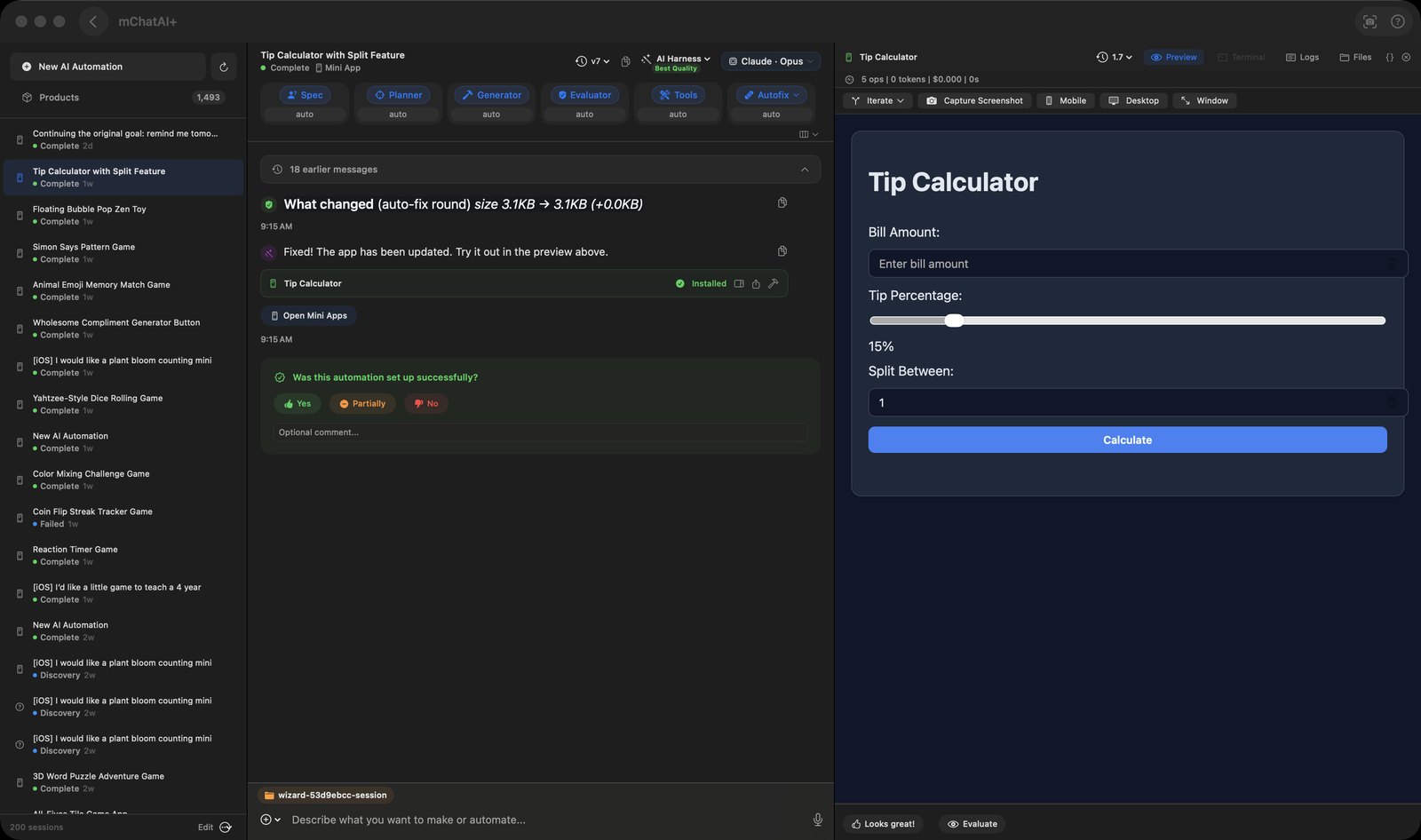
- The screen is three panes: a left rail with "New AI Automation" and a "Products" gallery of finished work, a chat in the middle, and a right pane with Preview, Terminal, Logs and Files tabs.
- It runs coding CLIs installed on your machine — Claude Code, Codex or Antigravity. A pill in the toolbar names which one and which model is actually in play (for example "Claude · Opus") rather than saying "default".
- Opening that pill gives you a "Primary AI" picker (Auto (ladder) / Claude / Codex / Antigravity), a model per task for that AI ("Iterating / editing", "Building new", "Auto-fixing"), a free-text box to pass an exact model id straight to the CLI for edits, and a list of what recent runs actually ran on.
- A separate menu picks a routing strategy rather than a provider: Best Quality, Lowest Cost, or Manual, each with a tooltip explaining what it does.
- Generated mini-apps are installed and previewed live. You can flip the preview between Mobile (375×812 with a Mobile Safari user agent, so media queries fire) and Desktop (1280×800), pop it into its own window with "Window", use "Capture Screenshot" to snap the current frame as the app's Hub thumbnail, or open the source read-only — which shows a diff against the previous version when one exists.
- Console errors from the live preview are counted in a red chip in the pane header; you can read and copy individual errors, "Clear Errors", or "Drop All Logs into Chat" so the harness fixes them. A separate auto-fix loop also runs on its own, and the stop button halts it as well as the current turn.
- "Iterate" takes a description of a change and produces a clean numbered version (Chess v4 → v5) with the original left untouched; a "Just change the look (re-skin)…" option sits in the same popover. A version-history menu lists every version with its age and offers Open or Rollback.
- Finished work can be published to Discover / the Community Hub, and generated images and audio carry their own Regenerate, Share, "Publish to Hub" and "Use as base" buttons alongside "Open in …", "Reveal in Finder" and "Copy Path".
- You can dictate into the composer with the mic, paste or attach an image, use "Capture App Screenshot", and point the session at a working folder (with a recent-folders list).
- While a session is generating, the composer swaps to "Type to steer the wizard...": a red stop button cancels just the session you are looking at, and an orange steering button queues your message to redirect the run after the current step, with a "Steering queued" banner you can cancel.
How to try it
- Open AI Harness from the Platform band on the home screen.
- Pick a tile under "Interactive Apps & Games" — "Mini App" is the one with no setup requirement.
- Type what you want in the box at the bottom and press the send arrow.
- When the app appears in the right-hand Preview tab, click "Iterate", describe one change, and confirm the new numbered version arrives with the original intact.
Works with
- mChatAIShell (gates macOS App, MCP Server and Python Service)
- Claude Code, Codex and Antigravity CLIs installed on the machine
- Mini Apps gallery (generated apps are installed there)
- Community Hub / Discover publishing
- Vault and AI Feed (finished work is written into the shared product store)
- mchataiDev (an "Open in mchataiDev" button on installed mini-apps)
- Xcode ("Open in Xcode") and VS Code ("Open in VS Code") handoffs for macOS-app and full-stack output
AI Harness ships with mChatAI+. Native macOS app. Your own API keys, or fully on-device. Get mChatAI+