The platform
For You
Works out what you've been into lately from your own activity on your Mac, and offers a way back in.
The platform
What it does
- Builds interest clusters from small activity records other applets write (a liked song, an article read, a finished podcast, a saved place, a completed to-do) over a rolling 30-day window. The clustering is pure deterministic code — no LLM, no network.
- Each record is filed under its strongest entity, in this order: artist, then the subject title, then author, then first tag, then genre — so a liked David Bowie track in AI Music and a Bowie page in Wikipedia collapse into one cross-applet cluster.
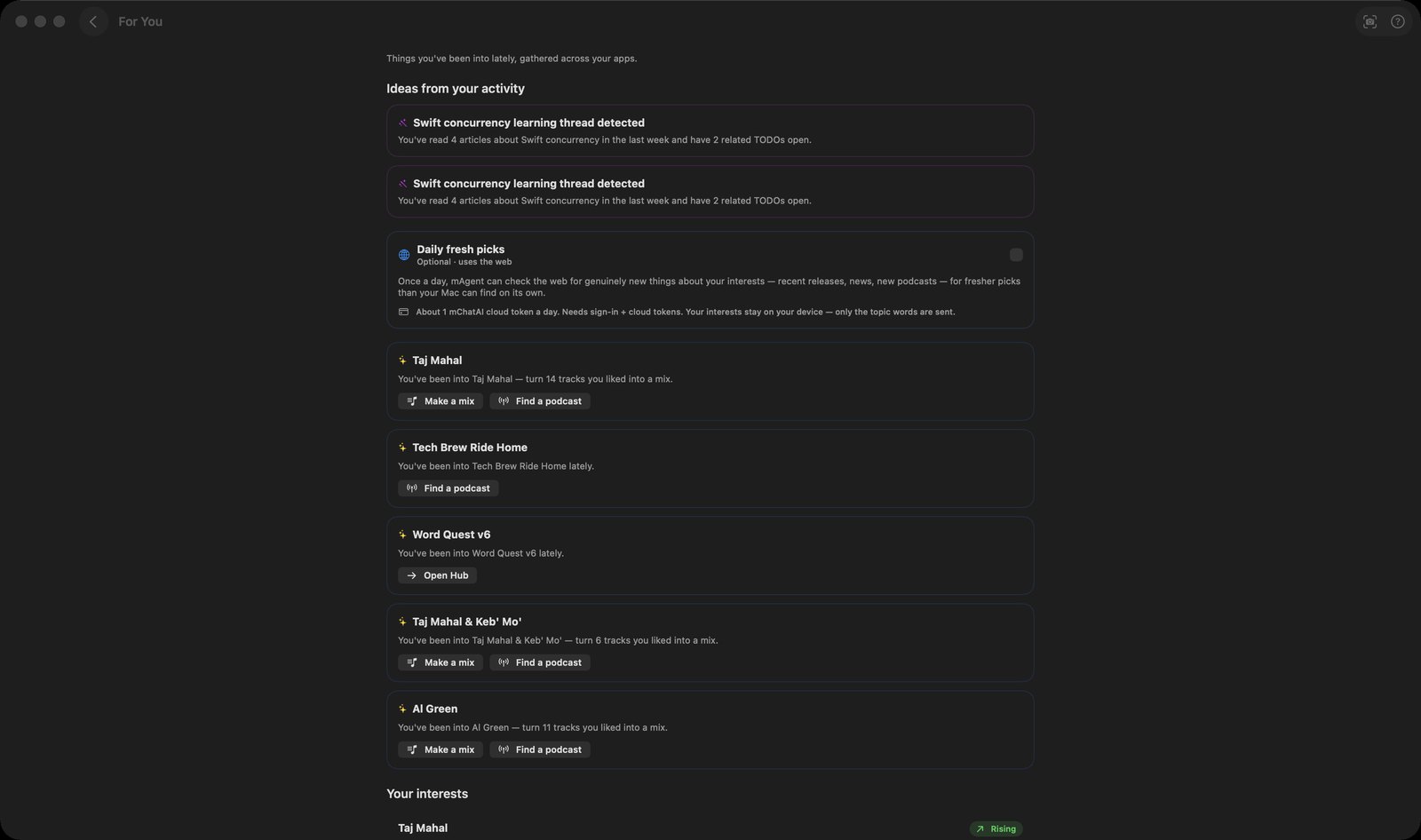
- Each cluster card under "Your interests" shows a strength bar, a Rising / Steady / Cooling badge, the subjects behind it, chips naming which applets it came from, and a signal count with how long ago.
- Writes one suggestion card for each of your top five clusters. Apple's on-device model supplies a short "did you know" fact when it is available and is badged "On-device"; when it isn't, a deterministic template sentence is used and the card carries no badge.
- Card buttons are fixed rules, not model choices: "Make a mix" for a music cluster, "Find audiobook" for a reading or audiobook cluster, "Find a podcast", or "Open <applet name>". A music cluster also gets "Find a podcast" as a second button.
- "Make a mix" opens a "New mix" sheet in place — you watch it assemble from your liked songs and Apple Music, use "Play this mix", swipe to remove tracks, then Save — rather than silently creating a playlist.
- "Daily fresh picks" is an explicit switch that is off by default. Turned on, and only once you are signed in and have cloud tokens, it checks the web once a day for genuinely recent items about your topics and shows them under "Fresh from the web"; the screen states only the topic words are sent. A Refresh button forces it.
- "Ideas from your activity" shows up to four read-only observations from the always-on cross-applet context agent. This screen renders them; it never triggers new ones.
- A footnote reads "Private to you. Stays on your device and your iCloud — never sent to mChatAI.com."
How to try it
- Use a few applets first — like a song in AI Music, read a Wikipedia page, finish a podcast — so there is activity to read.
- Open For You from the Platform band on the home screen.
- Read the cards under "Your interests" and click one, or use a card button such as "Make a mix" or "Find a podcast".
- To inspect or switch off the underlying signals, open the app's setup settings and pick "Usage Thumbprints" — it has an "Enable Usage Thumbprints" master switch, a per-applet list with counts, and a "Recent (last 14 days)" list.
Works with
- AI Music
- Audio Books
- AI Reader
- Wikipedia
- AI Radio
- AI Podcasts
- AI Write
- To-Do
- Map Guide
- CloudKit private database (signals sync between your own devices)
For You ships with mChatAI+. Native macOS app. Your own API keys, or fully on-device. Get mChatAI+