The platform
Ledger
A spreadsheet-like home for typed rows that pipelines, agents and mini-apps can all read and write.
The platform
What it does
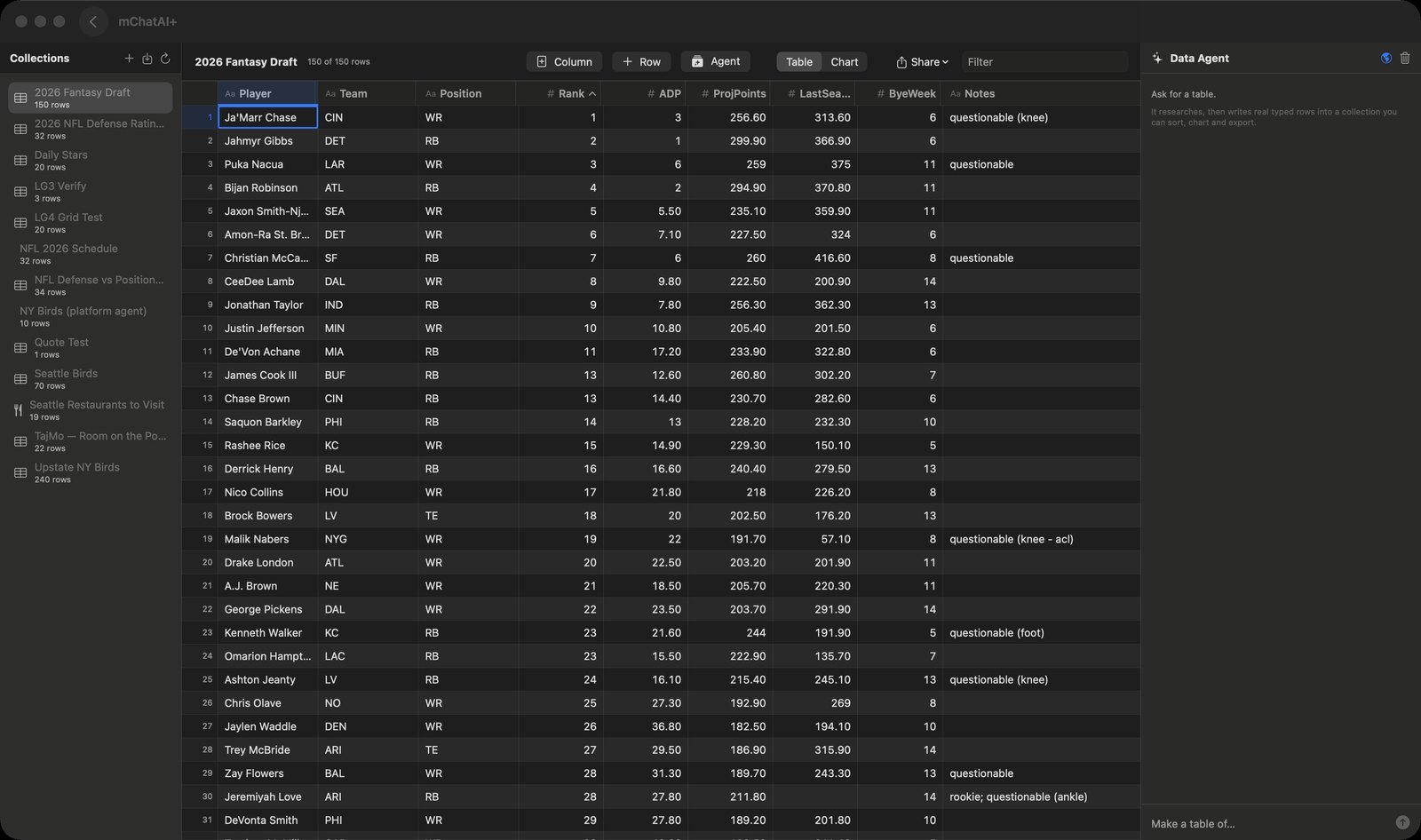
- A sidebar lists your collections with a live row count each; selecting one opens a grid with one column per field and a header showing "N of M rows".
- Cells are genuinely typed rather than all text: a number is right-aligned and monospaced, a checkbox is a glyph, a colour shows a swatch. Adding a column lets you pick text, line, number, checkbox, select, multiSelect, date, link, richText or color.
- The grid behaves like a spreadsheet — click a cell to select it, type to replace, Enter or double-click to edit, Tab across, arrow keys to move. A value the column cannot accept keeps your text on screen and says it was rejected instead of closing silently.
- Columns can be renamed from their own header, sorted ascending or descending, moved left / right / to front, resized by dragging, fitted to contents, and hidden (with a chip showing how many are hidden and a "Show All Columns" item). Rows can be appended, duplicated and deleted.
- A Filter box narrows the visible rows; a Table / Chart segmented switch flips the pane to a chart — a line-and-area chart plus n / sum / avg / min / max for a number or date column, a horizontal bar chart of counts for a category column.
- Import a CSV or TSV file as a new collection: it keeps the file's column order and infers each column's type (all-numeric becomes number, true/false/yes/no becomes checkbox, ISO dates become date, otherwise text). Export the collection to CSV, copy it as TSV, or paste rows in from the clipboard.
- An "Agent" button opens a "Data Agent" panel that takes a plain request like "make a table of…". A globe toggle decides whether it searches the web first — an explicit user choice, not the model's. It writes real typed rows, and every applied change is footnoted under the reply (for example "'Seattle Birds' 0 → 58 rows") so it cannot claim success on a write that did not land.
- The agent is limited to four operations — create a collection, add a column, append rows, set one cell — and its column types are checked against an allowed list, so it cannot mint a column you would be unable to edit.
- Pipelines append rows through a built-in "Ledger Append" skill, and mini-apps can list collections, read, append and search rows through a permission-gated bridge scoped to that app. Runs accumulate — Monday's rows and Tuesday's rows sit in one collection — rather than overwriting.
- Every user collection is registered as a product, so tables show up in AI Feed and the Vault with an "Open in Ledger" action. The product row is only a pointer; viewers read the live table back out of the store.
How to try it
- Open Ledger from the Platform band on the home screen — it is flagged core, so it is on every install even if you customised your grid.
- Click the download-arrow button next to "Collections" (tooltip: "Import a CSV or TSV file as a new collection") and pick a file.
- Click a cell and start typing to edit it; use the Table / Chart switch in the toolbar to plot a numeric column.
- Click "Agent" in the toolbar and ask for a table — for example "a table of the tallest buildings in Europe" — then read the green footnote under the reply saying how many rows landed.
Works with
- Pipelines (the built-in "Ledger Append" skill)
- Mini Apps runtime (permission-gated ledger.collections / rows / append / search bridge)
- AI Feed and Vault (collections appear as products)
- AI Slides (decks can read live rows)
- Workbench
- The built-in SQL Query skill
- Widget data refresh
Drive it from an agent
These commands are callable by Claude Code, Codex, or any agent talking to mChatAI+ through the portal:
ledger.getState
ledger.listCollections
ledger.getSchema
ledger.getRows
Ledger ships with mChatAI+. Native macOS app. Your own API keys, or fully on-device. Get mChatAI+