Everyday
Chat
One chat window for every model you've set up; it can search the web or read a project folder first.
Everyday · On the home screen by default
What it does
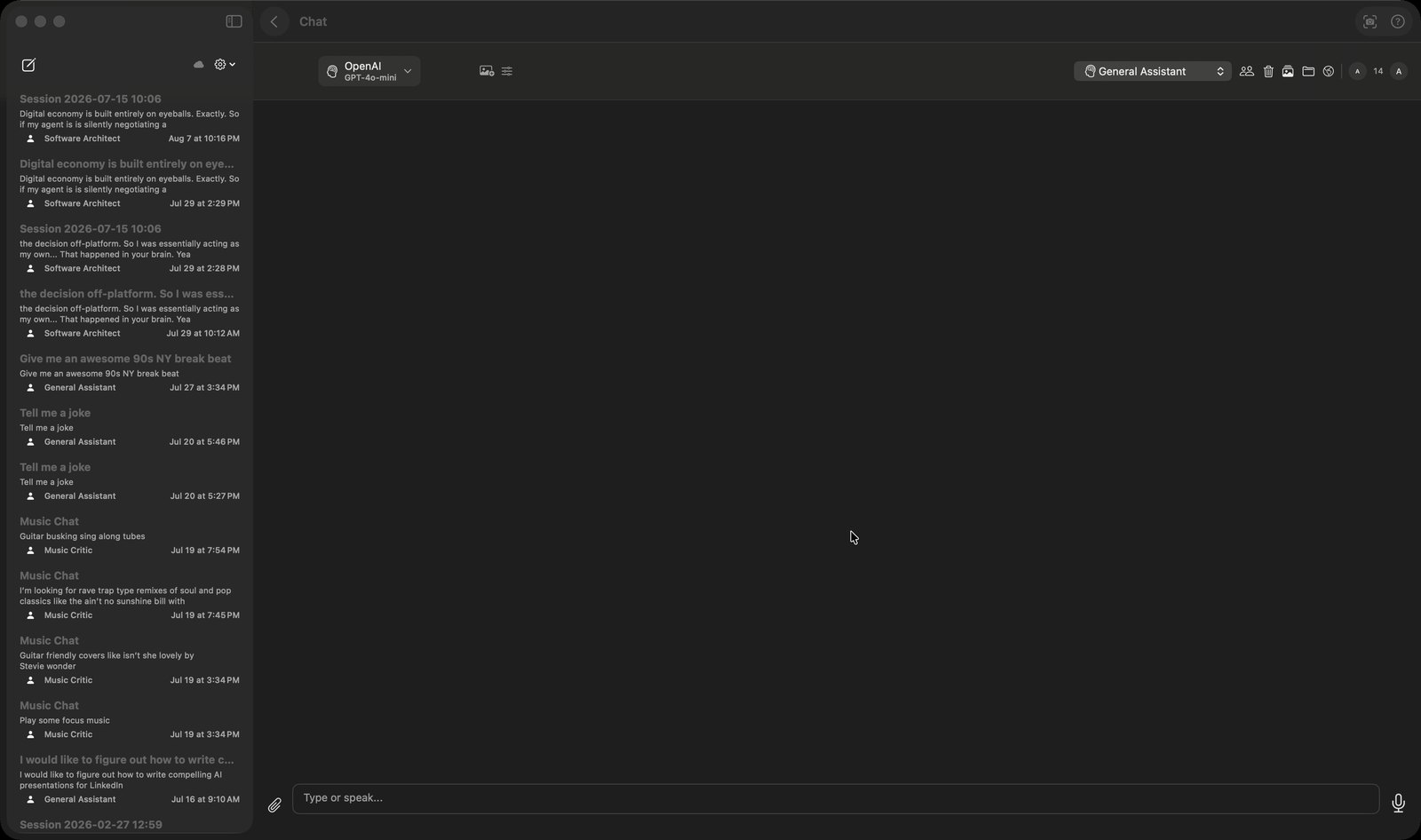
- Puts one chat window in front of eight back ends — Apple's on-device Foundation model, Ollama, Google, OpenAI, Anthropic, Perplexity, OpenRouter and mChatAI Cloud — picked from a menu at the top left. The menu hides any provider you have not configured: cloud providers need a stored API key, Ollama only appears when Ollama is actually reachable on your machine, and mChatAI Cloud only when a feature flag is on. Right-clicking an assistant reply opens 'Show details' with cost in USD, input/output token counts, model, provider and a copy-able generation id — each section shown only when the provider reported those numbers.
- Keeps conversations in a left sidebar, saved as one JSON file per conversation and written to iCloud (CloudKit) when it is available, with a manual 'Sync with iCloud' button as well. A pencil button starts a new thread, right-click deletes one, and a gear menu offers 'Delete All Conversations'. Runs made by the AI Harness are filtered out so they never appear in the list.
- Switches the assistant's character with a persona menu at the top of the window — General Assistant, The Comedian, Fitness Coach, The Chef, The Historian and Life Coach ship built in. A button next to it opens a manager where you add your own persona and write its System Prompt.
- Attaches files with the paperclip: the app extracts their text and prepends it as context, capped at 20,000 characters. For Anthropic and Google it sends PDFs and text files to the model as native document attachments rather than flattening them, and sends images inline where the provider supports it.
- Adds live web context when you turn on the globe button. The model you already selected is first asked, in a short JSON-only call, whether the question needs current information; if it says yes the app searches DuckDuckGo, takes up to five results, reads the first two pages (about 2,000 characters each) and shows the sources as clickable chips. Clicking a chip opens an in-app browser sheet instead of jumping to Safari.
- Searches a code folder you point it at with the folder button: the model proposes filenames to open and grep terms to look for, the app does the reading and grepping locally, and only the matching excerpts go back to the model.
How to try it
- On the home screen, click the Chat tile.
- Pick a model from the provider menu at the top left of the chat window — 'Foundation' runs on your Mac and needs no API key.
- Type into the box that reads 'Type or speak...' and press Return (Shift+Return for a new line).
- Click the globe button and ask about something recent — the pages it read appear as source chips above the composer.
Works with
- AI Audio — when the selected model is a music model (an id containing lyria, suno, riffusion, songbloom or musicgen) the request generates a track, saves it to the Audio Library's Generated folder and posts an inline player in the chat
- Hands Free AI — it builds the same ChatViewModel and the same PersonaManager, so it is literally the same chat engine driven by voice
- Ollama — local models appear in the same provider menu, and the code marks Foundation and Ollama as running on the user's own machine
Chat ships with mChatAI+. Native macOS app. Your own API keys, or fully on-device. Get mChatAI+