Everyday
AI Write
A document editor with ten one-click AI edits: fix grammar, adjust tone, simplify, summarize, expand.
Everyday · On the home screen by default
What it does
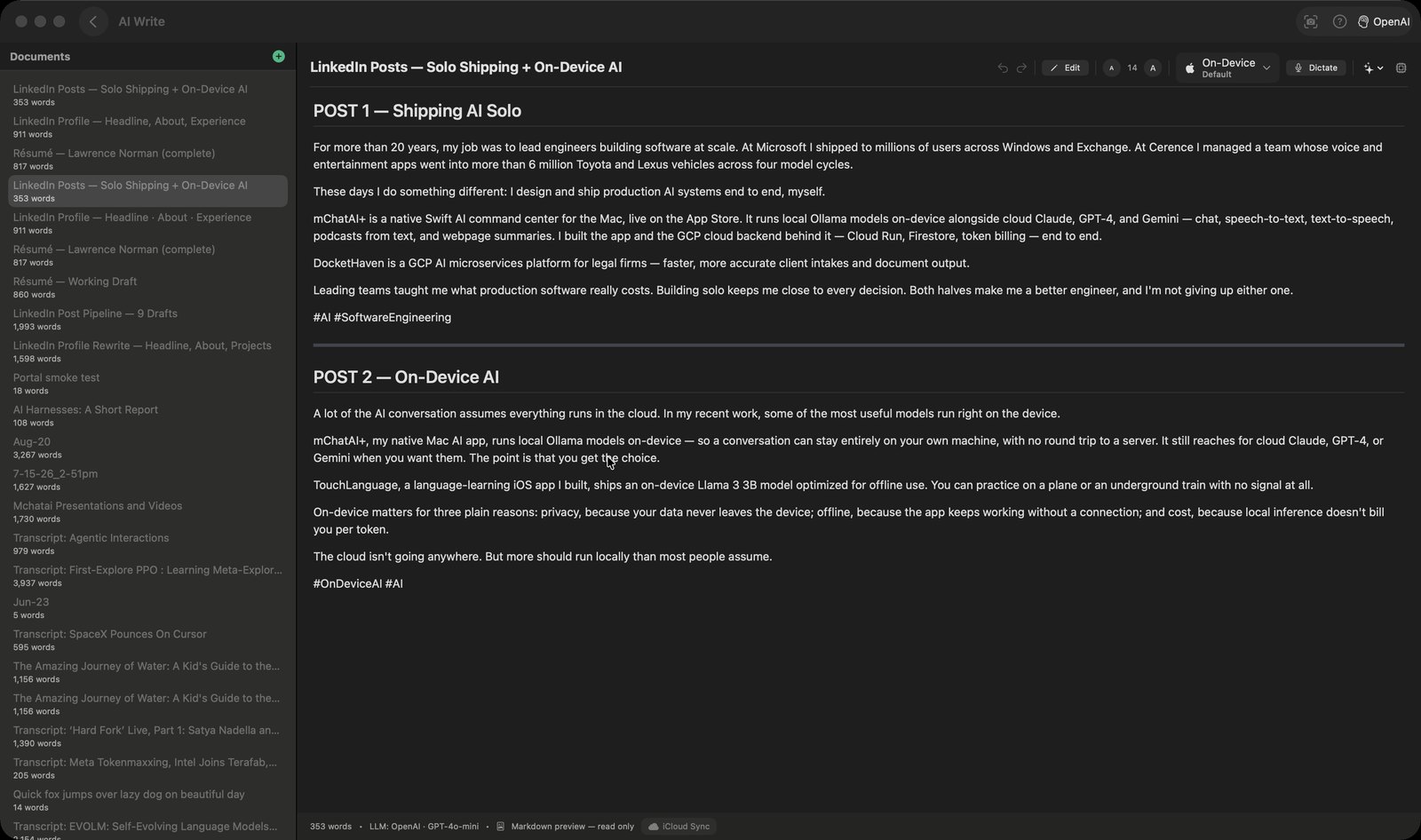
- Is a real document editor first: a sidebar list of documents with live word counts, a title field, undo/redo, a text-size stepper, and an autosave that fires about a second and a half after you stop typing.
- Offers ten AI operations from the sparkles button in the toolbar — Fix Grammar, Improve Style, Adjust Tone, Rewrite, Summarize, Expand, Simplify, Format & Clean Up, Extract Action Items, Key Quotes. 'Adjust Tone' opens a sheet where you type the tone you want (pre-filled with 'professional').
- Never overwrites your draft behind your back: the result lands in a panel at the bottom of the editor with Accept / Copy / Dismiss. Accept replaces the document text; Dismiss leaves the original alone. Every operation is passed the whole document, not a selection.
- Dictates straight into the document: a 'Dictate' button records, and a separate menu chooses whether speech-to-text runs on-device or through OpenAI or Google.
- Renders Markdown. A document that reads as Markdown opens rendered, and a Preview/Edit button (Shift-Cmd-P) flips between the rendered page and the raw source.
- Carries a second, separate 'AI Actions' popover (the cpu button) with five prompt-driven actions — Summarize, Expand, Rewrite, Extract Key Points and Translate — whose result gets the same Accept / Copy / Dismiss panel.
How to try it
- On the home screen, click the AI Write tile.
- Click the + button beside 'Documents' in the sidebar, then type or paste a draft into the editor.
- Click the sparkles button in the editor toolbar and choose 'Fix Grammar' (or 'Summarize', 'Adjust Tone', and so on).
- Read the result in the panel that appears at the bottom and click 'Accept' to replace your draft, or 'Dismiss' to keep it as it was.
Works with
- The agent layer — four verbs (listDocs, getDoc, createDoc, appendDoc) reach the same document store the window reads, so an agent's research or report can be written straight into AI Write
- The artifact router — AIWriteIngestHandler is registered for Markdown documents, research reports and blog posts, so output produced elsewhere in the app can be filed here as a document
- The iOS mChatAI app — both apps' AI Write stores are wired to the same CloudKit record type, so documents are meant to appear on both
Drive it from an agent
These commands are callable by Claude Code, Codex, or any agent talking to mChatAI+ through the portal:
aiwrite.listDocs
aiwrite.getDoc
aiwrite.createDoc
aiwrite.appendDoc
AI Write ships with mChatAI+. Native macOS app. Your own API keys, or fully on-device. Get mChatAI+