Audio
Audiocast Creator
Paste text, pick a voice, and get a narrated audio file — filed into your Audio Library automatically.
Audio
What it does
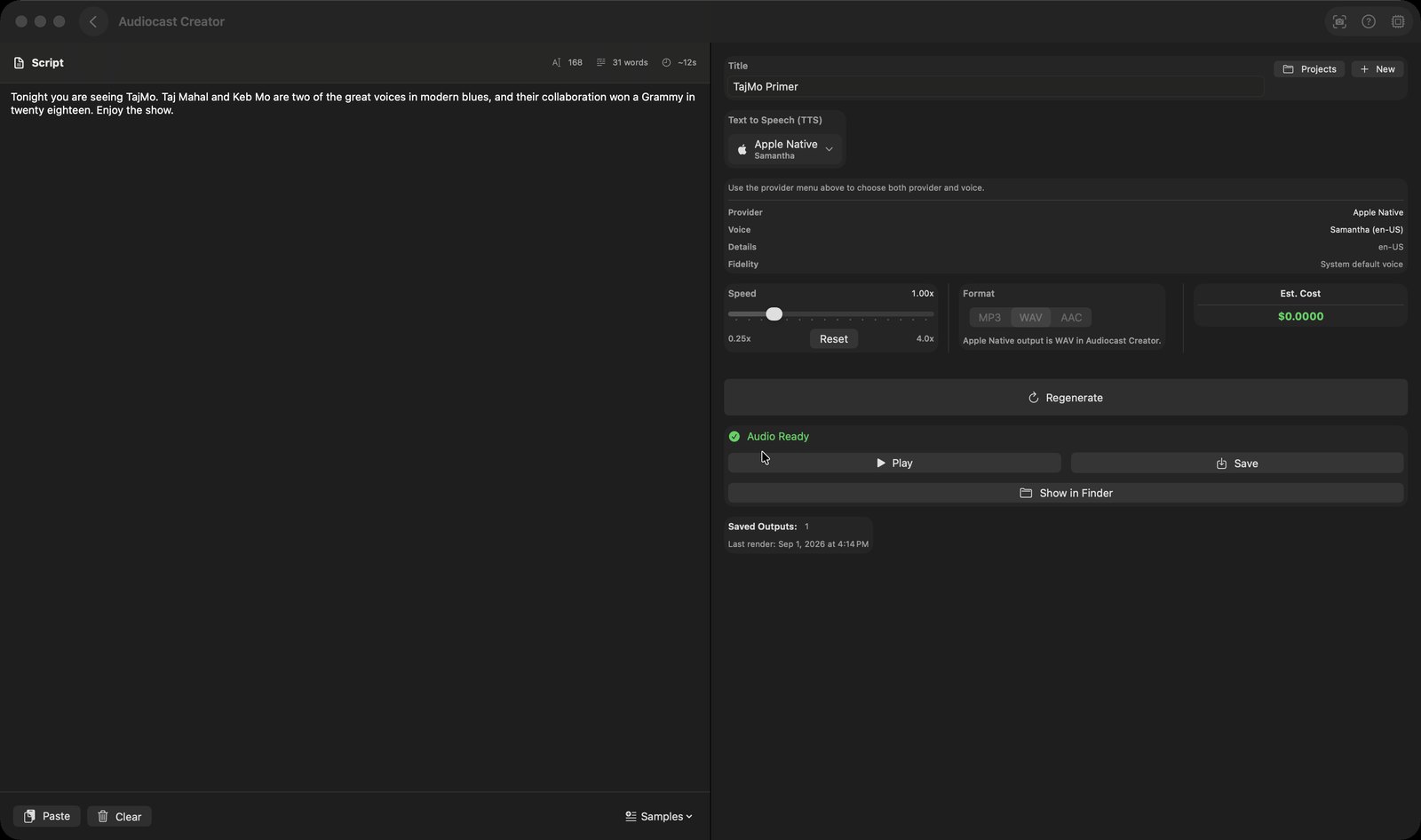
- Two-pane editor: a script area on the left showing character count, word count and an estimated spoken duration, with Paste, Clear and a 'Samples' menu holding News, Story and Tech sample texts
- One provider-and-voice menu covering Apple Native, OpenAI, Google Cloud, ElevenLabs and mChatAI Cloud; it lists only providers you have actually configured (plus whichever one is currently selected)
- A Speed slider from 0.25x to 4.0x, an MP3/WAV/AAC format picker (locked to MP3 for ElevenLabs and WAV for Apple Native), a Standard/HD quality switch for OpenAI, and a running estimated cost in dollars
- 'Generate Audio' renders the narration with a progress bar you can cancel, then offers Play, Save (a standard save dialog) and 'Show in Finder'; 'Regenerate' re-renders the same script
- Work is kept as named projects — 'Projects' lists saved ones to load, rename or delete, 'New' starts a fresh one, and every render is kept with its date so a project shows a 'Saved Outputs' count
- A toolbar button (tooltip 'AI Actions') slides in a side panel with five helpers that run on the current script: Research Topic, Write Script, Show Notes, Fact Check and Suggest Topics. The answer appears in the panel with Copy and Clear buttons — it is not inserted into the script
How to try it
- On the mChatAI+ home screen, open the 'Audio' band and click the 'Audiocast Creator' card.
- Open the 'Samples' menu and pick 'News Sample' to fill the script area, or paste your own text.
- In the right column, use the 'Text to Speech (TTS)' menu to pick a provider and voice (Apple Native needs no key), then press 'Generate Audio'.
- When it finishes, press 'Play' to hear it, or 'Save' to write the file wherever you want.
Works with
- AI Audio — each finished render is also imported into the Audio Library's 'Podcasts' folder
- iOS app — the same render is uploaded to iCloud by the podcast delivery service so the iPhone's audio library can pull it down
- Vault — an 'Open in Audiocast Creator' link reopens the exact saved project it came from
Audiocast Creator ships with mChatAI+. Native macOS app. Your own API keys, or fully on-device. Get mChatAI+