In the lab · Built and working, but only in the direct download of mChatAI+, behind the Show Experimental switch on the home screen.
LoopStar
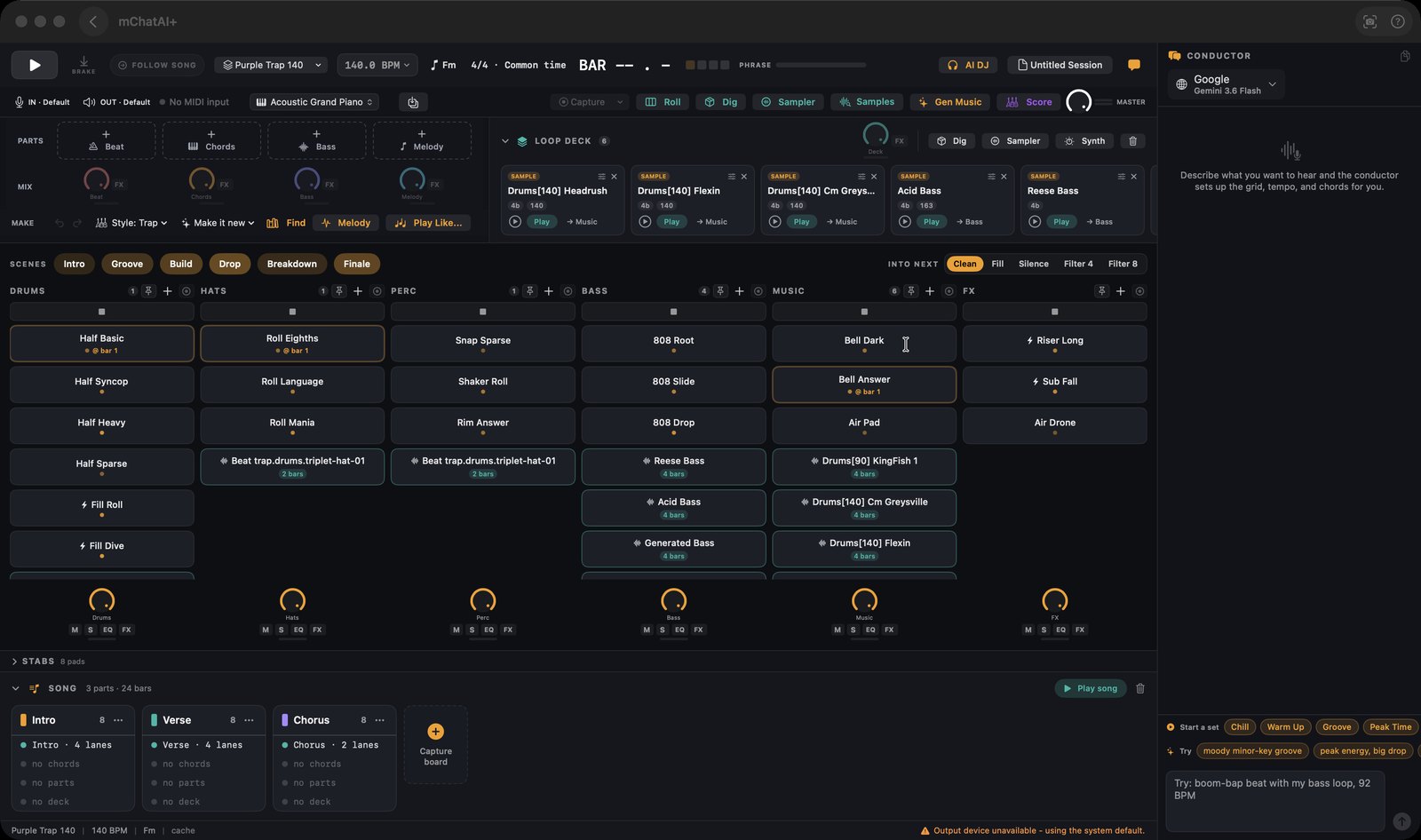
Launch loops on a six-lane grid where every change lands on the bar, then export the song as a WAV.
In the lab · Experimental, in the direct download only — switch on Show Experimental on the home screen to see it
What it does
- Plays loops on a six-lane grid - drums, hats, percussion, bass, music, fx - where clicking a cell starts the transport and queues the loop to land on the next bar rather than cutting in mid-beat, and a scene button switches every lane at once
- Loads sound packs as content: 23 packs ship in mchatai-source with base tempos from 75 to 174 BPM, and none of the loop names or tempos are compiled into the app
- Sets tempo three ways - a 50-150% slider against the pack's base tempo, an exact BPM you type, or tapping in time - with a Reset button that returns to the pack default
- A "Make it new" menu generates fresh material in the session's key: New Beat, New Chords, New Bass or New Melody, with a different variation each press, and the melody can play through any of the 128 General MIDI instruments
- Samples what your Mac is playing (via ScreenCaptureKit) or your microphone, then lets you scrub the take and punch a loop out of it onto a lane; a Samples browser keeps and analyses those captures
- Builds a song from parts (Verse 16, Chorus 8, and so on), each carrying its own chords and scene, with a FOLLOW SONG button that plays the arrangement through and an "Export Song as WAV..." action that writes it to a file
- "Play Like..." loads one of 68 public-domain compositions from the Song Book offline; type any other title and it researches that song's chords and key on the web, cites the source, and builds inspired-by material rather than a copy
- A Score window opens on its own, showing guitar chord shapes, piano voicings and solo scales lighting up in time with the song
How to try it
- Open LoopStar and choose a pack from the pack menu in the transport bar - it is labelled with the current pack's name.
- Click any cell in the grid; the transport starts and the loop drops in on the next bar.
- Click one of the scene buttons above the grid to switch every lane together.
- Open the session menu (its label is your session's name) and choose "Export Song as WAV...".
Works with
- AI Audio (Audio Library) - the exportToAudioLibrary verb renders the arrangement to a bar-exact WAV and files it there
- Vault - LoopStar sessions and jingles appear as products, with "Open in LoopStar" and "Open in AI Audio" actions
- mchatai-source - packs.json (23 packs), styles.json (24 genres), the 68-song Song Book and the downloadable instrument catalog are content that ships without an app update
- MIDI hardware - LoopStarMIDIService drives a live instrument strip and a bar-synced "Capture" that records played chords into the chord track
Drive it from an agent
These commands are callable by Claude Code, Codex, or any agent talking to mChatAI+ through the portal:
loopstar.listGenres
loopstar.setGenre
loopstar.setBPM
loopstar.setKey
loopstar.getState
loopstar.exportToAudioLibrary
loopstar.craftChords
loopstar.craftMelody
loopstar.jingle
loopstar.openJingle
loopstar.listJingleForms
LoopStar ships with mChatAI+. Native macOS app. Your own API keys, or fully on-device. Get mChatAI+